Showing posts with label XamarinForms. Show all posts
Delpin Susai Raj Monday, 12 October 2020

Xamarin.Forms - Support Dark Mode

In this blog post, you will learn how to give support Dark Mode in Xamarin.Forms.

Introduction

Xamarin.Forms code runs on multiple platforms - each of which has its own filesystem. This means that reading and writing files is most easily done using the native file APIs on each platform. Alternatively, embedded resources are a simpler solution to distribute data files with an app.

Dark Mode


Nowadays iOS and Android apps should support both Dark and Light Theme.

Prerequisites

  • Visual Studio 2017 or later (Windows or Mac)

Setting up a Xamarin.Forms Project

 Start by creating a new Xamarin.Forms project. You wíll learn more by going through the steps yourself.

Create a new or existing Xamarin forms(.Net standard) Project. With Android and iOS Platform. 

Create a Theme

Create a ResourceDictionary for both Light and Dark Theme.

DarkTheme.xaml

LightTheme.xaml


Set App Theme

In app.xaml you can set the default theme.

App.xaml

Now, Create a Enum in App.xaml.cs

Create a Interface

Create a interface for set Theme at runtime.


iOS Implementation

Below code to change the Theme at runtime.

ThemeHelper.cs


Android Implementation

Below code to change the Theme at runtime.

ThemeHelper.cs


Consuming the Styles


Now, you can use the resource "DynamicResource BackgroundColor" like this.


Click the "Play" button to try it out.

Dark Mode
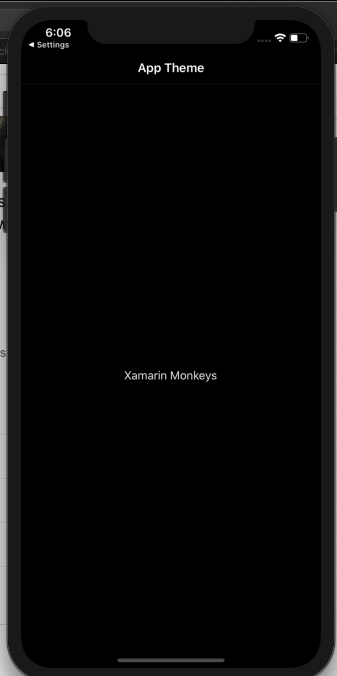

Light Mode

I hope you have understood you will learn how to give support Dark Mode in Xamarin.Forms..

Thanks for reading. Please share your comments and feedback. 

Happy Coding :)

Delpin Susai Raj Friday, 19 June 2020

Xamarin.Forms - Enable Default Zooming in Webview

In this blog post, you will learn how to enable webview default zooming in xamarin forms.

Introduction
 
Xamarin.Forms code runs on multiple platforms, each of which has its own filesystem. This means that reading and writing files are most easily done using the native file APIs on each platform. Alternatively, embedded resources are a simpler solution to distribute data files with an app.

Prerequisites
  • Visual Studio 2017 or later (Windows or Mac)
Setting up a Xamarin.Forms Project
 
Start by creating a new Xamarin.Forms project. You will learn more by going through the steps yourself.
 
Create a new or existing Xamarin forms (.Net standard) Project with Android and iOS Platform.

Choose the Mobile App (Xamarin. forms) project under C# and Mobile.
 
Name your app. You probably want your project and solution to use the same name as your app. Put it on your preferred location for projects and click "Create".
 
Now, select the blank app and target platforms - Android, iOS, and Windows (UWP).
 
Subsequently, go to the solution. In there, you get all the files and sources of your project (.NET Standard). Now, select the XAML page and double-click to open the MainPage.Xaml page.
 
You now have a basic Xamarin.Forms app. Click the Play button to try it out.

Create a Custom Webview

Here going to create a custom webview inherit from webview for custom rendering to enable zooming.

CustomWebView.cs


Android Implementation
 
There are two ways in android.

1. Use Platform Specific code.

Following code snippets enable the default zooming in webview.

MyWebView.xaml.cs


2. Custom Renderer

Here, Create a custom renderer for enabling zooming in android.

CustomWebViewRenderer.cs


iOS Implementation
 
Here, Create a custom renderer for enabling the webview default zooming in iOS.
 
CustomWebViewRenderer.cs


Consuming the CustomWebview
 
Here, consume the Custom Webview in your xaml

Add Namespace


Add your Custom Webview

MyWebPage.xaml


MyWebPage.xaml.cs


Click the "Play" button to try it out

Android 
You can test zoom by emulator also use Shift + ctrl + Left click and mouse move

iOS 
Simulator also support zoom use Alt + Left click and mouse move

Wow, It's working.😍
 
I hope you have understood how to enable webview default zooming in Xamarin.Forms.
 
Thanks for reading. Please share your comments and feedback.

Happy Coding 🙌